Creating Transactions in Filament
It’s time to get our hands dirty with the heart of any finance application: transactions. In this lesson, we’ll build a complete Transaction resource in Filament—with dedicated pages for creating and editing, proper data scoping, and a slick income/expense toggle that will make entering data a pleasure.
Creating the Transaction Resource
Unlike our previous resources that used the --simple flag for modal-based CRUD, transactions deserve their own dedicated pages. This gives us more room to breathe and a better user experience.
php artisan make:filament-resource TransactionThis command generates the full resource structure with separate pages for listing, creating, and editing. You can see the initial setup in this commit.
Scoping Transactions to the Authenticated User
Just like our other resources, we need to ensure users can only see and manage their own transactions. However, since we have multiple pages now, we need to apply scoping in a few places.
Scoping the Query
In TransactionResource.php, we override getEloquentQuery() to filter by the authenticated user:
public static function getEloquentQuery(): \Illuminate\Database\Eloquent\Builder
{
    return parent::getEloquentQuery()->where('user_id', auth()->id());
}
Automatically Assigning the User ID
When creating a transaction, we don’t want users to select themselves—we assign the user_id automatically. In CreateTransaction.php:
public function mutateFormDataBeforeCreate(array $data): array
{
    $data['user_id'] = auth()->id();

    return $data;
}
Scoping Related Resources in the Form
Users should only see their own bank accounts, categories, and budgets in the dropdown menus. We apply a filter directly in the relationship callback:
Select::make('bank_account_id')
    ->relationship('bankAccount', 'name', fn ($query) => $query->where('user_id', auth()->id()))
    ->required(),
Select::make('category_id')
    ->relationship('category', 'name', fn ($query) => $query->where('user_id', auth()->id())),
Select::make('budget_id')
    ->relationship('budget', 'name', fn ($query) => $query->where('user_id', auth()->id())),
You can review all the scoping changes in this commit.
Improving the Form Experience
After creating our first few transactions, we notice some friction. The field order isn’t intuitive, and we get sent to the edit page after creation instead of back to the list.
Reordering Form Fields
A logical order makes data entry faster. Let’s put the most important fields first:
return $schema
    ->components([
        DatePicker::make('date')
            ->required(),
        TextInput::make('amount')
            ->required()
            ->numeric(),
        TextInput::make('description')
            ->required(),
        Select::make('bank_account_id')
            ->relationship('bankAccount', 'name', fn ($query) => $query->where('user_id', auth()->id()))
            ->required(),
        Select::make('category_id')
            ->relationship('category', 'name', fn ($query) => $query->where('user_id', auth()->id())),
        Select::make('budget_id')
            ->relationship('budget', 'name', fn ($query) => $query->where('user_id', auth()->id())),
        Textarea::make('note')
            ->columnSpanFull(),
    ]);
Redirecting After Creation
By default, Filament redirects to the edit page after creating a record. For transactions, returning to the list makes more sense. In both CreateTransaction.php and EditTransaction.php:
protected function getRedirectUrl(): string
{
    return $this->getResource()::getUrl('index');
}
See these improvements in this commit.
Polishing the List View
The table view needs some love too. We want better column ordering, proper currency formatting, and quick actions.
Formatting and Reordering Columns
return $table
    ->columns([
        TextColumn::make('date')
            ->date()
            ->sortable(),
        TextColumn::make('amount')
            ->money('EUR')
            ->sortable(),
        TextColumn::make('description')
            ->searchable(),
        TextColumn::make('bankAccount.name')
            ->searchable(true),
        TextColumn::make('category.name')
            ->searchable(true),
        TextColumn::make('budget.name')
            ->searchable(true),
        TextColumn::make('note')
            ->toggleable(isToggledHiddenByDefault: true),
        // ... timestamps
    ]);
Adding Row Actions
Instead of just bulk actions, let’s add edit and delete buttons directly on each row:
->recordActions([
    EditAction::make(),
    DeleteAction::make(),
])
Check out these table improvements in this commit and this commit.
The Income/Expense Toggle
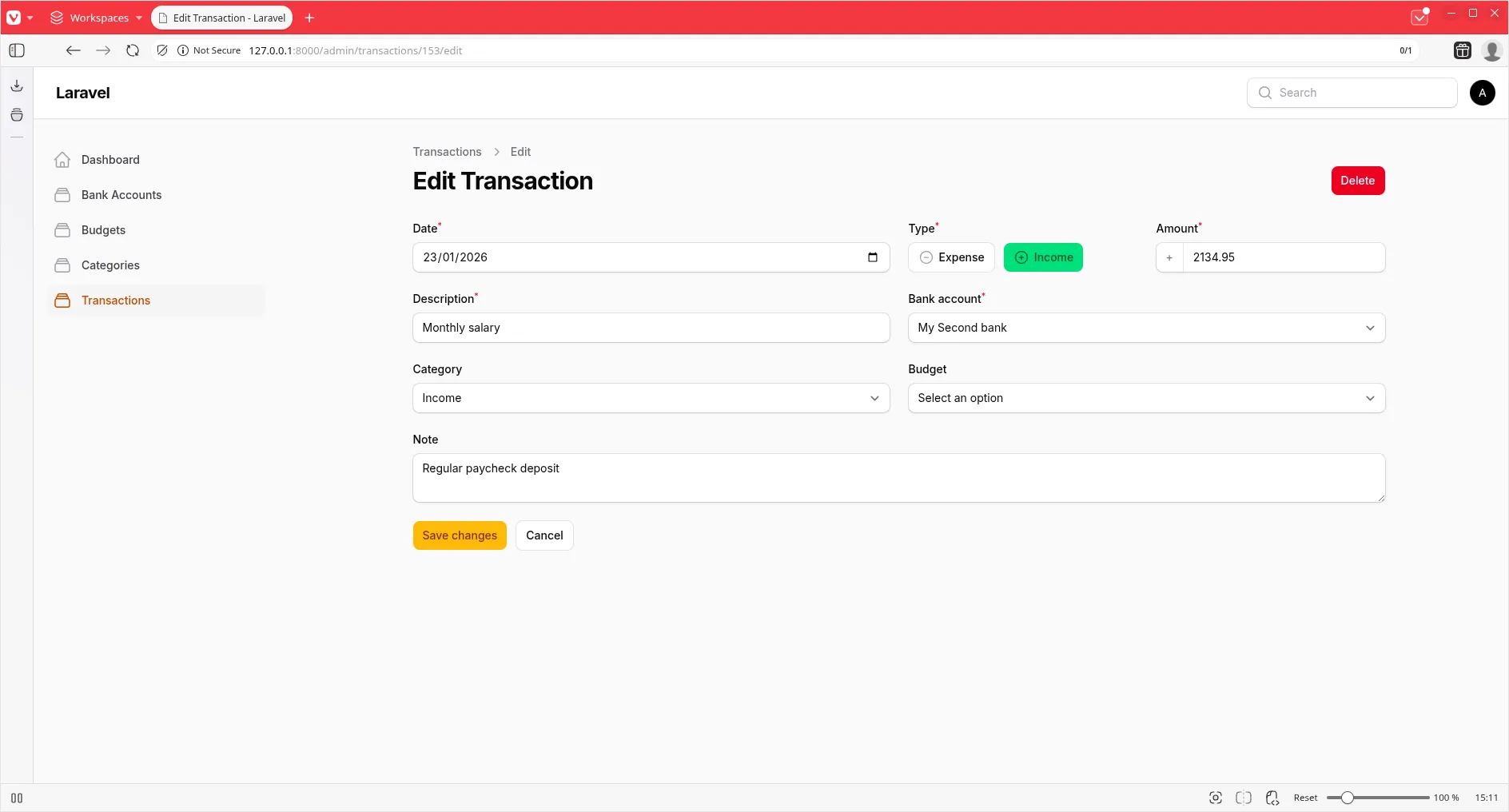
Now for the star of the show! Instead of manually entering negative amounts for expenses, let’s create an intuitive toggle that handles the sign automatically.
Building the Toggle
We use Filament’s ToggleButtons component with icons and colors to make the choice obvious:
use Filament\Forms\Components\ToggleButtons;
use Filament\Schemas\Components\Group;
use Filament\Schemas\Components\Utilities\Get;

Group::make([
    ToggleButtons::make('transaction_type')
        ->label('Type')
        ->options([
            'expense' => 'Expense',
            'income' => 'Income',
        ])
        ->icons([
            'expense' => 'heroicon-o-minus-circle',
            'income' => 'heroicon-o-plus-circle',
        ])
        ->colors([
            'expense' => 'danger',
            'income' => 'success',
        ])
        ->default('expense')
        ->inline()
        ->required()
        ->afterStateHydrated(function (ToggleButtons $component, $state, $record) {
            if ($record && $record->amount !== null) {
                $component->state($record->amount >= 0 ? 'income' : 'expense');
            }
        })
        ->live(),
    TextInput::make('amount')
        ->label('Amount')
        ->required()
        ->numeric()
        ->minValue(0)
        ->prefix(fn (Get $get) => $get('transaction_type') === 'income' ? '+' : '-')
        ->afterStateHydrated(function (TextInput $component, $state) {
            if ($state !== null) {
                $component->state(abs($state));
            }
        })
        ->dehydrateStateUsing(function ($state, Get $get) {
            $amount = abs((float) $state);

            return $get('transaction_type') === 'income' ? $amount : -$amount;
        }),
])->columns(2),
The magic happens in three places:
afterStateHydratedon the toggle: When editing, it reads the current amount and sets the toggle accordingly.afterStateHydratedon the amount: Displays the absolute value so users always see positive numbers.dehydrateStateUsing: Before saving, it converts the amount to positive or negative based on the toggle selection.
Visual Feedback in the Table
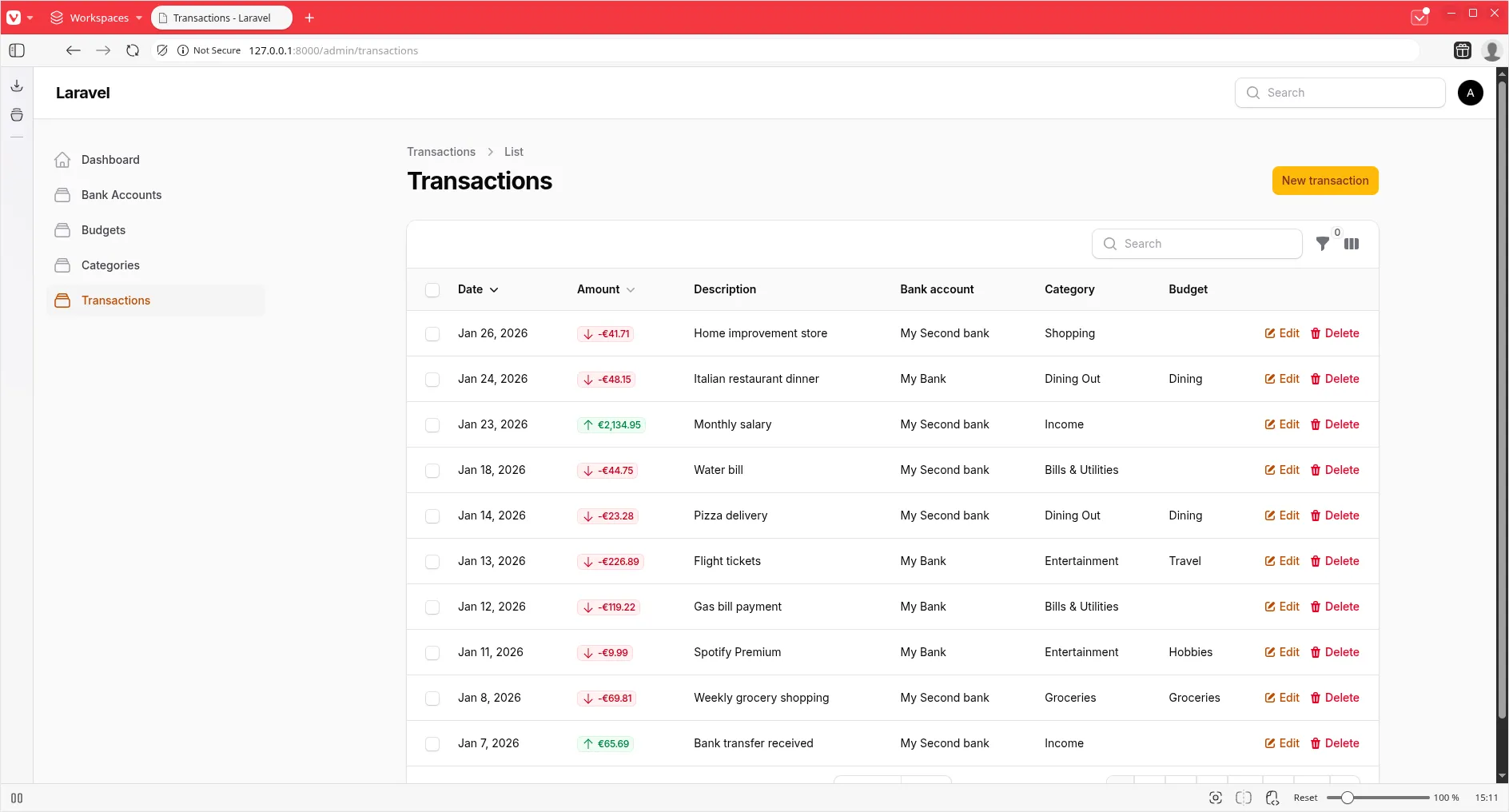
Let’s make the amount column clearly show income vs. expense with badges and colors:
TextColumn::make('amount')
    ->money('EUR')
    ->sortable()
    ->badge()
    ->color(fn ($state): string => $state >= 0 ? 'success' : 'danger')
    ->icon(fn ($state): string => $state >= 0 ? 'heroicon-o-arrow-up' : 'heroicon-o-arrow-down'),
We also add a filter to quickly view only income or expenses:
SelectFilter::make('transaction_type')
    ->label('Tipo')
    ->options([
        'income' => 'Entrate',
        'expense' => 'Uscite',
    ])
    ->query(function (Builder $query, array $data): Builder {
        return $query
            ->when(
                $data['value'] === 'income',
                fn (Builder $query): Builder => $query->where('amount', '>=', 0),
            )
            ->when(
                $data['value'] === 'expense',
                fn (Builder $query): Builder => $query->where('amount', '<', 0),
            );
    }),
See the complete toggle implementation in this commit.
Making Categories and Budgets Optional
Not every transaction needs a category or budget. Let’s add a migration to make these fields nullable:
Schema::table('transactions', function (Blueprint $table) {
    $table->foreignId('category_id')->nullable()->change();
    $table->foreignId('budget_id')->nullable()->change();
});
And remove the ->required() from the form fields.
Testing the Transaction Resource
Finally, let’s ensure everything works correctly with comprehensive tests. We need to verify:
- Users can only see their own transactions
- Users can create, edit, and delete their transactions
- Users cannot access other users’ transactions
- Users cannot create transactions for other users’ bank accounts
it('cannot see other users transactions', function () {
    $user = User::factory()->create();
    $otherUser = User::factory()->create();
    $otherTransaction = Transaction::factory()->for($otherUser)->create();

    Livewire::actingAs($user)
        ->test(ListTransactions::class)
        ->assertCanNotSeeTableRecords([$otherTransaction]);
});

it('can create transaction', function () {
    $user = User::factory()->create();
    $bankAccount = BankAccount::factory()->for($user)->create();

    Livewire::actingAs($user)
        ->test(CreateTransaction::class)
        ->fillForm([
            'date' => '2026-01-30',
            'transaction_type' => 'expense',
            'amount' => '150.00',
            'description' => 'Test Transaction',
            'bank_account_id' => $bankAccount->id,
        ])
        ->call('create')
        ->assertHasNoFormErrors();

    assertDatabaseHas('transactions', [
        'user_id' => $user->id,
        'bank_account_id' => $bankAccount->id,
        'description' => 'Test Transaction',
        'amount' => -15000, // 150.00 * 100, negative for expense
    ]);
});

it('cannot create transaction for other user bank account', function () {
    $user = User::factory()->create();
    $otherUser = User::factory()->create();
    $otherBankAccount = BankAccount::factory()->for($otherUser)->create();

    Livewire::actingAs($user)
        ->test(CreateTransaction::class)
        ->fillForm([
            'date' => '2026-01-30',
            'transaction_type' => 'expense',
            'amount' => '150.00',
            'description' => 'Test Transaction',
            'bank_account_id' => $otherBankAccount->id,
        ])
        ->call('create')
        ->assertHasFormErrors(['bank_account_id']);
});
View the complete test suite in this commit.
Don’t Forget to Format!
As always, keep your code clean and consistent:
./vendor/bin/pintWrapping Up
We’ve built a fully functional Transaction resource with:
- Dedicated pages for a better UX
- Proper scoping to ensure data privacy
- An intuitive income/expense toggle
- Beautiful visual feedback in the table
- Comprehensive tests for peace of mind
Your personal finance app is really taking shape. Happy coding!